
Preview of our new website. The new Yoodoo app is coming soon. Tell us what you think →
The ADHD planner. And yes, the best one.

Your brain isn't broken.
Your planner was.

Yoodoo plans your day, fixes it the second it falls apart, and locks you in. The all-in-one that finally sticks.

  • iPhone
  • Android
  • Mac and PC
  • Web

★★★★★ 4.8 on the App Store · 100k+ downloads

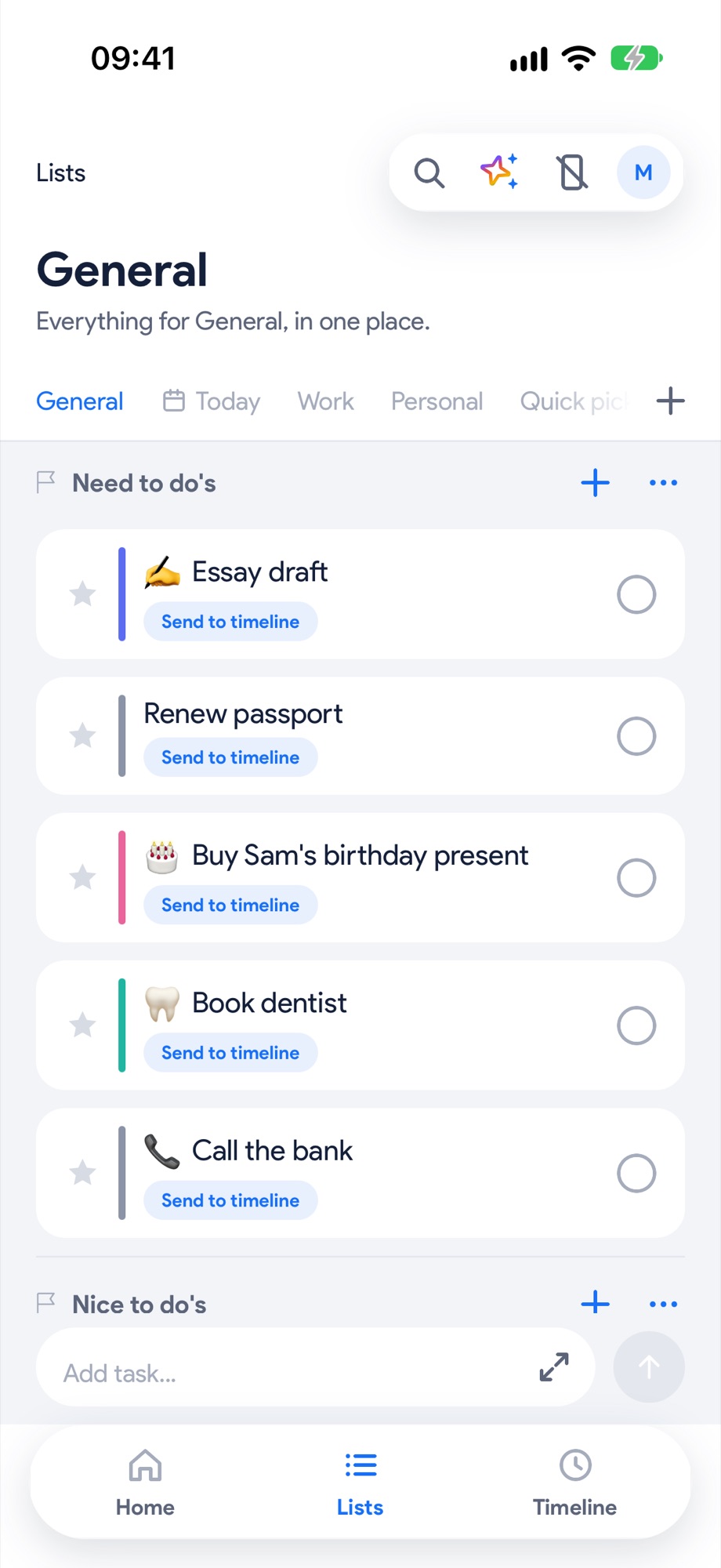
Lists: everything out of your head, the one that matters starred
Lists
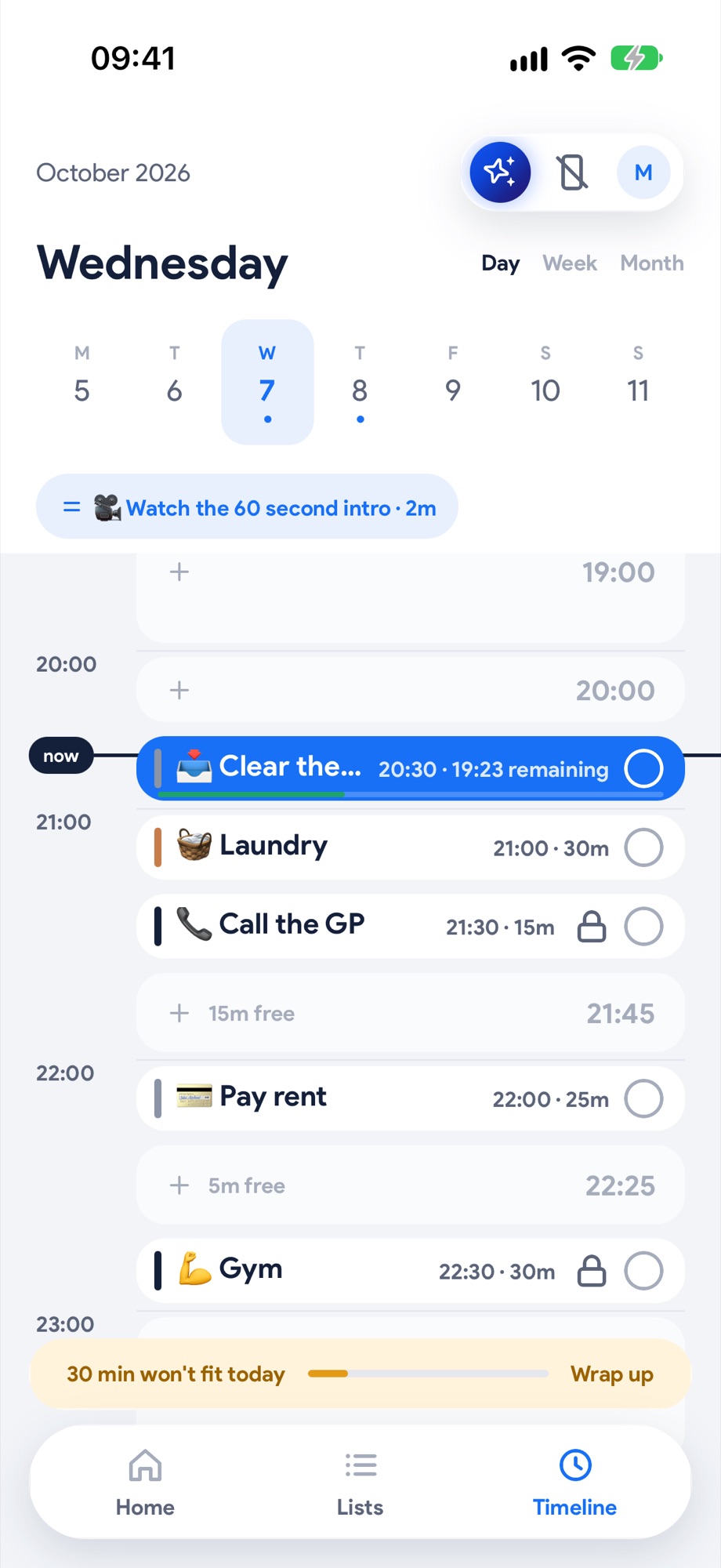
The Timeline: an hour looks like an hour, the current task in blue
Timeline
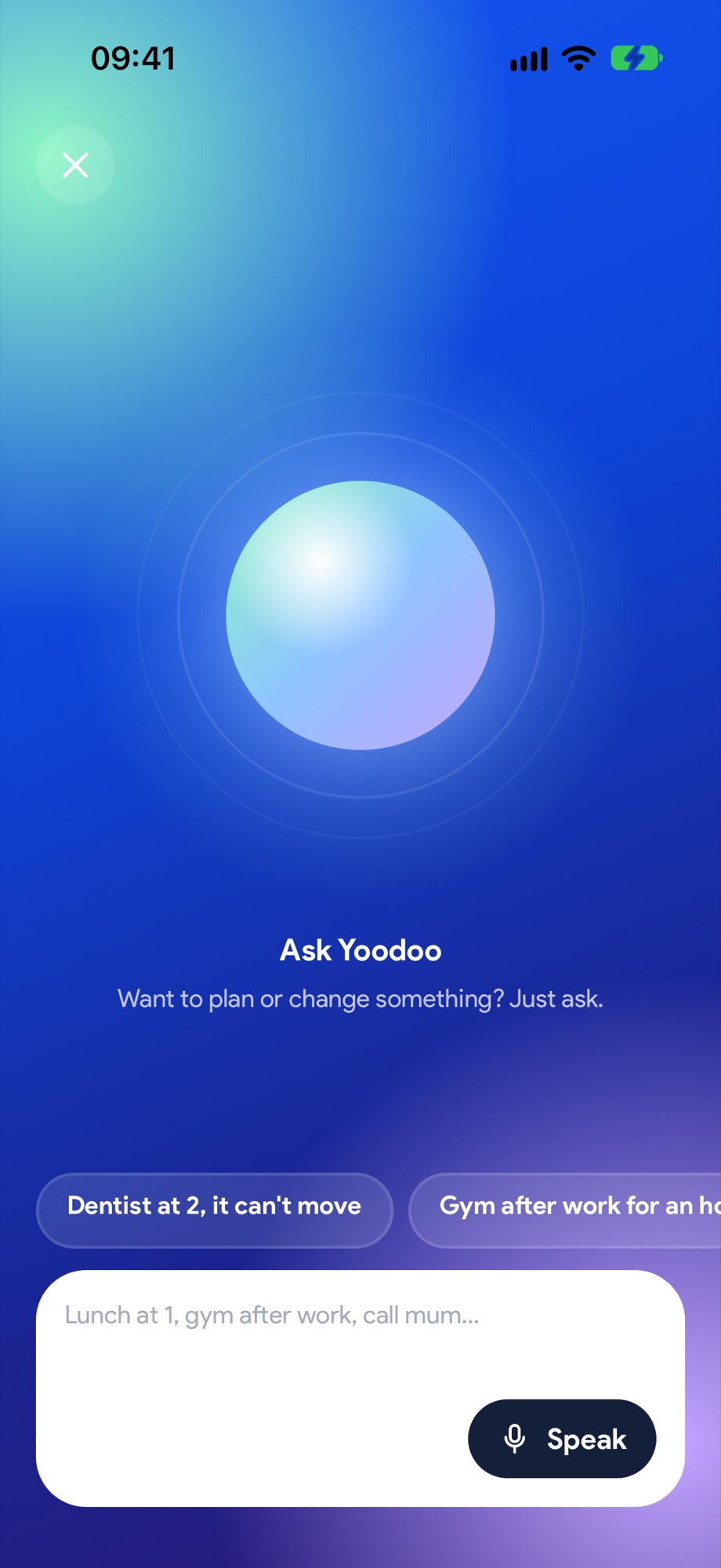
Ask Yoodoo: want to plan or change something? Just ask.
Ask Yoodoo
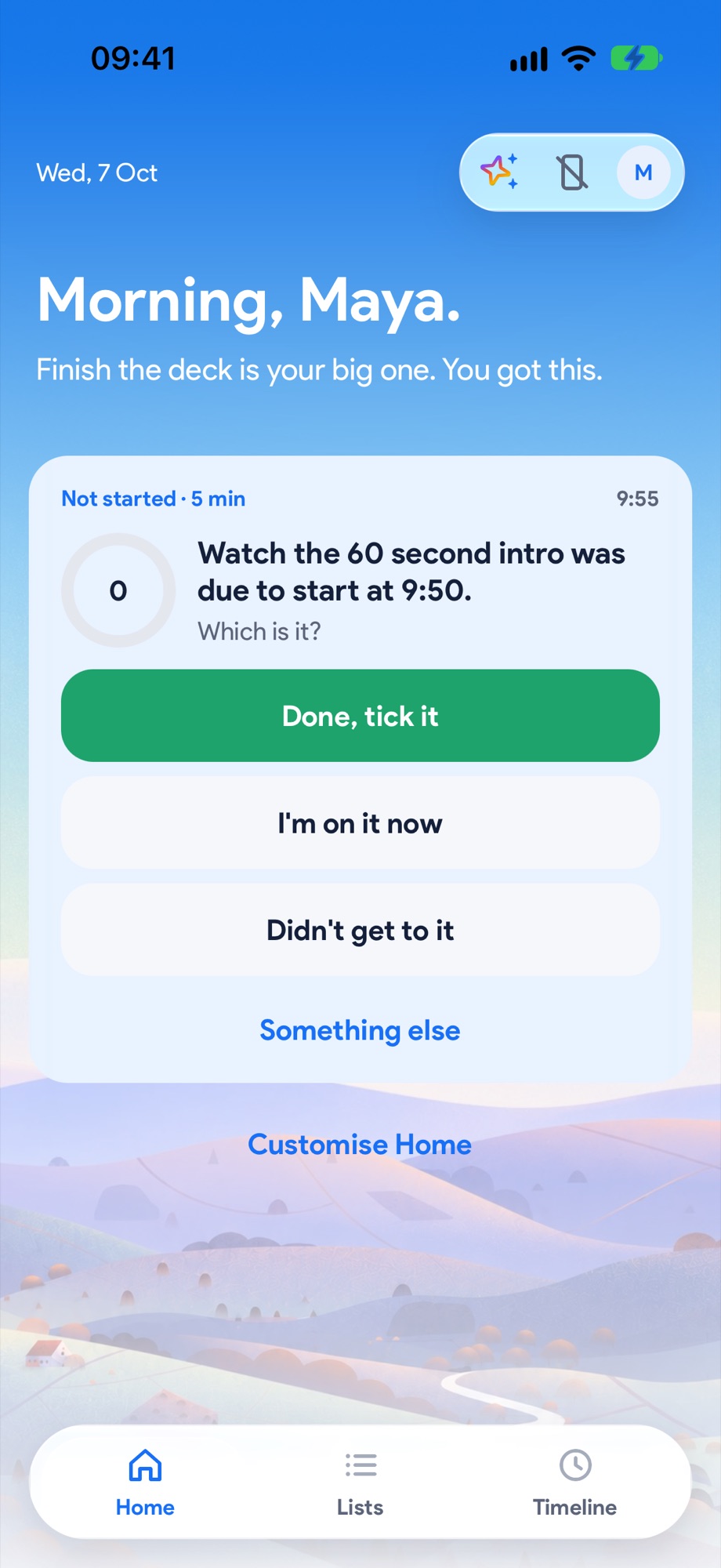
Home: Yoodoo noticing you haven't started, and asking which it is
Home
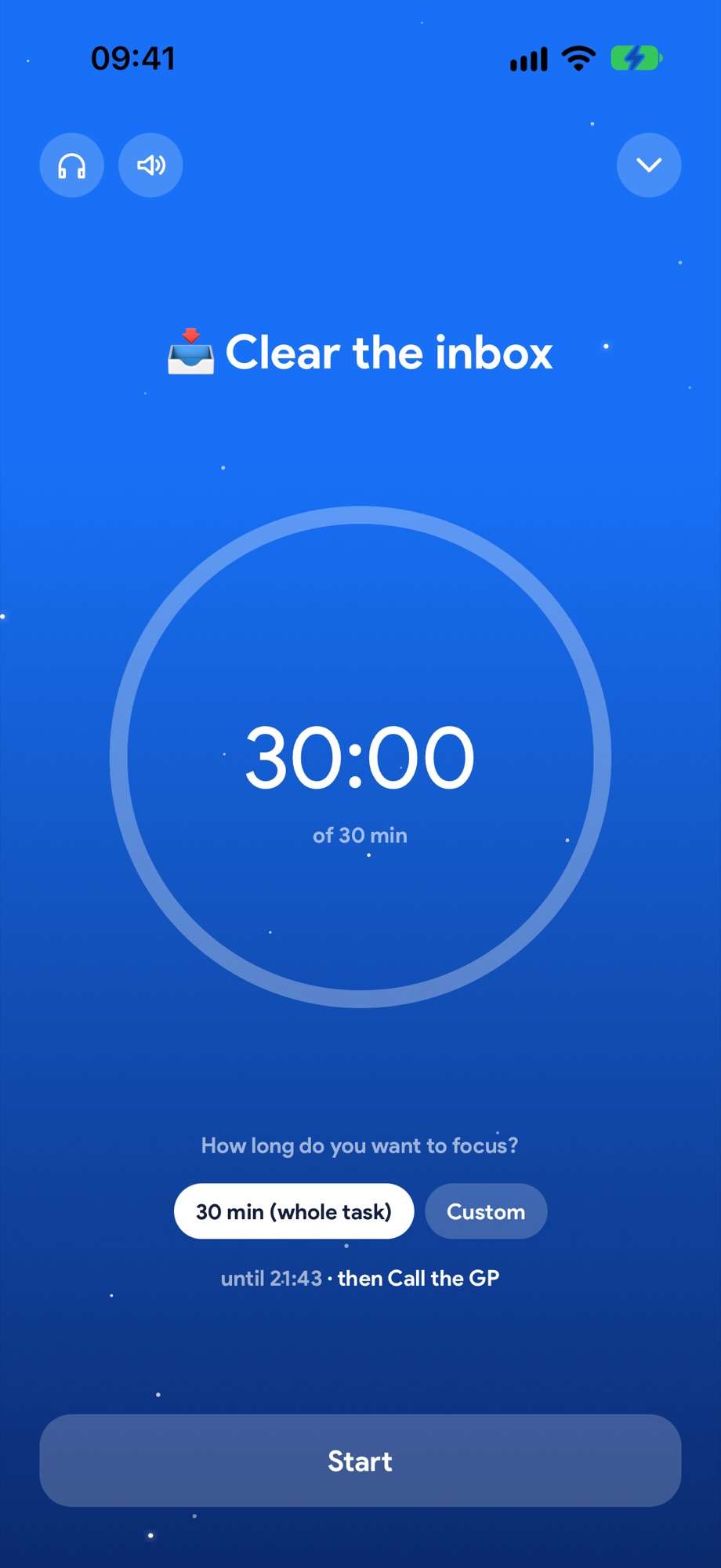
Focus: one task, one timer, your phone quiet
Focus
Who it's for

Loved by ADHD brains.
And everyone else.

Built ADHD first, for every brain that's wired a little differently. Diagnosed, on a waiting list, just pretty sure, or simply juggling too much. If your days keep breaking, it's for you.

  • Diagnosed with ADHD
  • Pretty sure it's ADHD
  • Founders and freelancers
  • Creators
  • Students
  • Parents

You're not lazy. Your day just keeps breaking.

Sound familiar? Tap the ones that sound like you.

  • Show me how →
  • Show me how →
  • Show me how →
  • Show me how →
  • Show me how →
  • Show me how →

Probably not for you if you need a project tool for your whole team. Or if your days already go to plan. Lucky you.

Fix my day · Our favourite bit

You'll fall off.
We planned for that.

Every plan works until about 10am. Then a call runs long, you lose an hour to your phone, or you just don't start. That's where most plans die, and the day gets written off.

Yoodoo expects it. It fits the rest of your day around what actually happened, so you keep going.

  1. Yoodoo notices

    Something ran over, or never got started. Home asks you about it.

  2. You answer one question

    Done, still going, or didn't get to it. One tap.

  3. Your day re-fits

    Everything after shifts, with room to breathe. Meetings never move. Big changes show you first, small ones undo in a tap.

No red. No guilt. No starting again tomorrow.

How it works

List. Plan. Focus. Fix.

One day in Yoodoo, in the real app. Scroll through it.

08:00 · Lists

List it.

Everything in your head, out. Type, send, next. Star what matters.

See how, step by step →
08:05 · The Timeline

Plan it.

Drop it on your timeline, or just ask Yoodoo to plan the lot. Done in seconds.

See how, step by step →
09:00 · Home and Focus

Focus.

One task. One timer. Distracting apps blocked. Go.

See how, step by step →
14:20 · Fix my day

Fix it.

Ran over? One tap and your whole day re-fits. Straight back on track.

See how, step by step →
  1. 08:00 · Lists

    List it.

    Everything in your head, out. Type, send, next. Star what matters.

    See how, step by step →
  2. 08:05 · The Timeline

    Plan it.

    Drop it on your timeline, or just ask Yoodoo to plan the lot. Done in seconds.

    See how, step by step →
  3. 09:00 · Home and Focus

    Focus.

    One task. One timer. Distracting apps blocked. Go.

    See how, step by step →
  4. 14:20 · Fix my day

    Fix it.

    Ran over? One tap and your whole day re-fits. Straight back on track.

    See how, step by step →
Yoodoo AI

Just say it.
Yoodoo AI does the rest.

It's the smart bit. It knows your calendar, your lists and your habits. Walking, cooking, mid-panic? Say what's on and your whole day is planned in seconds, around everything that can't move. Plans changed? Say that too. You stay one step ahead without lifting a finger.

  • Hands-free
  • Seconds, not minutes
  • Scary smart
  • You always say yes first
Your day
    Looks right
    Speak

    Plan your day

    • “Dentist at 2, it can't move”
    • “Finish the report first, it matters most”
    • “I'm low on energy, keep today light”

    Change it when it slips

    • “Push everything back 30 minutes”
    • “Move the report to 4pm”
    • “Move what's left to tomorrow”

    Fill your lists

    • “Add call mum, buy milk and pay rent to my Work list”

    Start and tick habits

    • “Start a habit to read 20 minutes every weekday”
    • “I did my walk”

    Save and load templates

    • “Save today as a template”
    • “Load my gym day template”

    Break big things down

    • “Break the report into steps”

    Nothing changes until you say Looks right.

    Lock in

    Your phone,
    finally on your side.

    The apps on your phone are built to grab exactly the brain that's looking for something more interesting than the boring task. So don't rely on willpower. Take the option away, and give yourself one thing to do.

    Widgets

    Make Home yours.
    Keep your day in sight.

    Water, mood, your meds, your streak. Pick what sits on Yoodoo's Home, and put your day on your phone's Home Screen and Lock Screen too.

    Inside Yoodoo

    Home starts simple. Add up to four widgets, two to a row, and drag them into your order. Then add the cards you want underneath.

    • 💧 Water with your own goal and glass size
    • 🙂 Mood, a one-tap check-in once a day
    • 💊 Meds, vitamins, anything daily as a habit, ticked from Home
    • 🔥 Streak and ⏱️ Focus today
    • 📅 Next up, your calendar, your Today list, this week's mission and the app blocker

    And on your Home Screen and Lock Screen

    • Today

      Your whole list on your Home Screen. Tick things off right there.

    • Now and Next

      What you're on and what's coming, on your Home Screen or Lock Screen.

    • Live Activities

      Your focus timer on the Lock Screen, counting down while you work.

    • Siri

      Add a task, hear what's next, or start your next task, hands free.

    More on widgets →

    Mac, PC and web

    Plan at your desk.
    Do it on your phone.

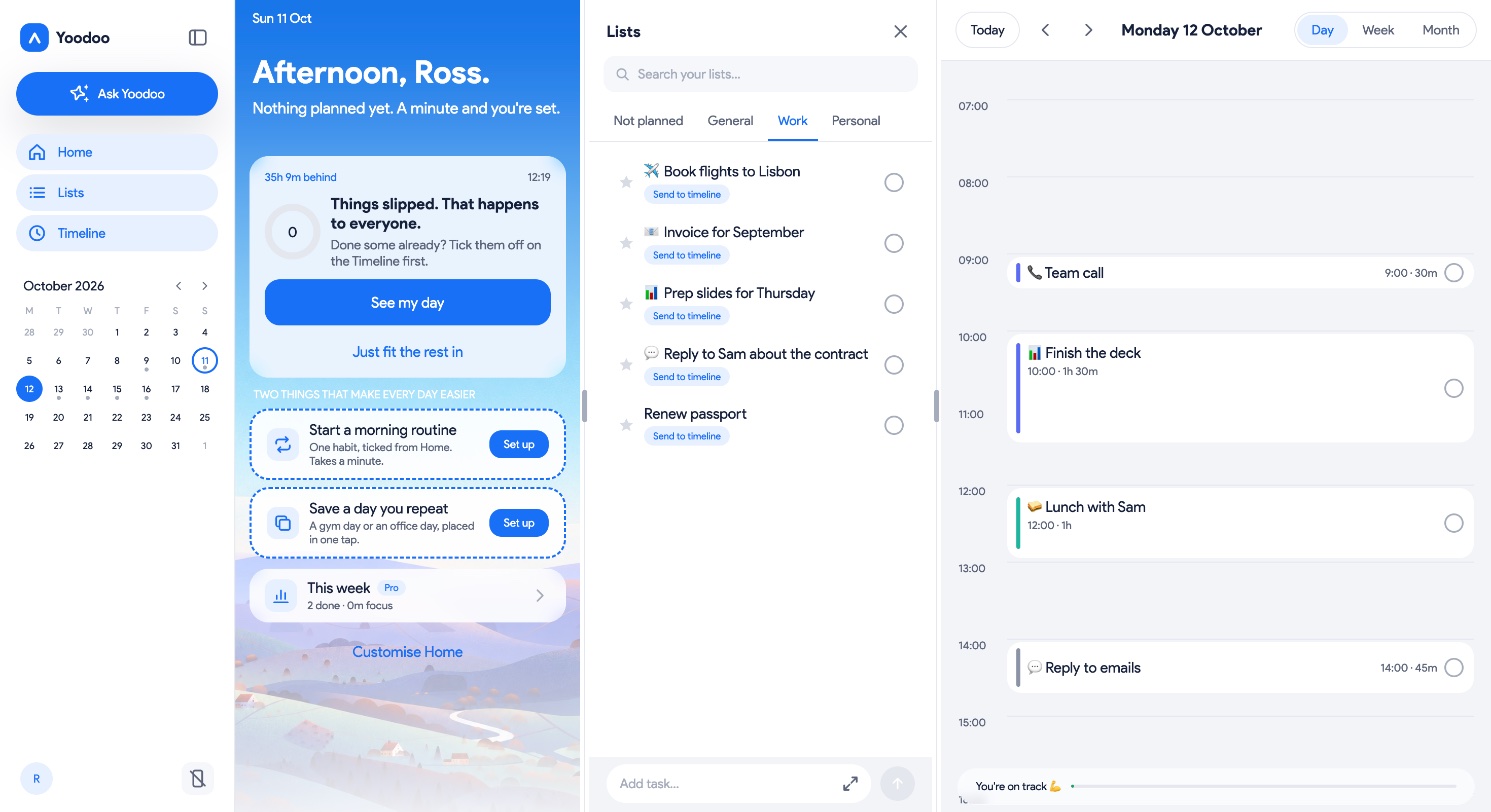
    Yoodoo isn't just on your phone. Open it in any browser on your Mac or PC, see the whole week, and it all stays in sync.

    Yoodoo on a computer with everything in one view: Home with what's next, the Work list with things still to plan, and Monday's timeline
    • Your whole week at a glanceDay, Week and Month, on a screen big enough to see it all.
    • Home, lists and timeline, side by sideWhat's next, what's waiting and where it fits, in one view.
    • In sync with your phonePlan at your desk, then your phone keeps you on track.
    See Yoodoo on the webFree to start.
    ★★★★★ 4.8 on the App Store

    100,000 people
    getting stuff done.

    • ★★★★★

      “I LOVE Yoodoo! I can't remember a time I was this productive! Very easy to use! Timeblocking is great for me.”

      Dustin Butler
    • ★★★★★

      “Love this app!! I can't remember a time I was this productive!”

      Stephanie Teggart
    • ★★★★★

      “I got the app to help me manage my routine (and ADHD!). I'm still getting used to the app right now. The free trial is a nice touch.”

      Lara Devgan
    • ★★★★★

      “You can create really easily a crystal-clear daily time-schedule that you can follow and mark as finished as the day progresses.”

      App Store review
    • ★★★★★

      “It's pretty good! I really like having both a to-do list AND a quick add task list.”

      Natasha Nicole
    • ★★★★★

      “WOW, wow, very excited. I have just subscribed for the free trial and love it!”

      Cheryl Newman
    Ross, founder of Yoodoo
    Founder's letter

    Why we built Yoodoo.

    Hi, I'm Ross.

    I've had about 20 careers and 70 jobs. For most of my life I thought that was a flaw. Proof that something in me just couldn't stick.

    Then I found design, and it held me. I went on to be a senior product designer at places like Spotify and Ticketmaster. And I still couldn't get my own days under control. Every planner I tried punished me for missing a day, and by Wednesday the whole thing had fallen apart.

    So I built my own system, bit by bit, over years. Whenever something held me back, the anxiety, the fear of failing, the days that just slipped away, I did whatever it took to get past it. Then I kept what worked.

    I didn't know any of it had a name. But as I shared it, people kept telling me the same thing: this was the first thing that had ever worked for their ADHD brain. After three years of hearing it, I got assessed. I was 39, and I'd had ADHD my whole life.

    Twenty careers taught me this. A brain that can't stick isn't broken. It's looking for the thing worth sticking to. And when it finds it, it doesn't do anything by halves.

    Yoodoo is my third app, and the one I'm completely hyperfocused on. It's the system that got me here, built to understand you. It plans your day with you, tells you what's next when you freeze, and picks you back up when the day goes sideways. I've helped thousands of people with ADHD take back control of their days. Now it's your turn.

    We're not here to make you more productive. We're here to help you have more good days. The ones where you did the thing, and still had time left for you.

    We're building this for all of us. Every message you send in the app gets read, and answered. So if Yoodoo helps you, tell a friend. If it doesn't, tell us.

    RossFounder and CEO, Yoodoo

    How we compare

    The best ADHD planner.
    Yep, we said it.

    Good apps, all of them. Only one gets you back on track, locks you in and plans your day for you.

    YYoodooTTiimoSStructuredSSunsama
    Gets your day back on track when it falls apartOne tapAI reshuffle, when you askReplan (Pro, Apple only)Daily ritual
    Locks you in: blocks the apps that distract you✓✕Via a separate app✕
    Plans your day for you, just by askingPlans, moves, lists, habitsStep-by-step plansDrafts a scheduleAI and integrations
    Blocks out real time on a timeline✓✓✓✓
    Keeps your calendar in sync both ways✓Import onlyImport only✓
    Built for ADHD brains first✓NeurodivergentAmong others✕
    A year$59.99$54$29.99$204

    From their own pages, 9 October 2026: Tiimo, Tiimo co-planner, Tiimo calendar, Structured, Structured blocking, Sunsama. Yearly prices in US dollars. Got one wrong? Tell us. See every comparison →

    Pricing

    You deserve the best. It just doesn't cost much.

    Every feature, free for a week. Then it's less than a coffee a month.

    $4.99/month

    Billed $59.99 a year. Or $7.99 monthly, or $149.99 once. Lite is free forever.

    Start your free weekWhat's in Lite and Pro →
    • We never sell your data
    • No ads, no ad trackers
    • On Lite, your plans stay on your phone
    • Our privacy policy →
    Is Yoodoo only for people with ADHD?

    No. It was made by someone with ADHD and shaped by a lot of people with distracted brains, so it's built for the moments days go wrong: running over, waiting for the thing at 4, not being able to start. If that's ever you, it's for you.

    It isn't a diagnosis or a treatment. It's a planner.

    I've tried a dozen planners. What's different?

    Most planners show you a list and leave you to it. Yoodoo shows your day as time, where an hour looks like an hour, and fixes the plan when it slips. Run over and one tap moves the rest. Your meetings never move. Nothing turns red and nothing piles up.

    See it in Fix my day.

    What happens when I run over?

    Yoodoo asks one question and moves what can move. Your calendar events and anything you locked stay put. The day’s priority is protected, and anything that no longer fits goes to Anytime instead of being crammed in. See it step by step.

    What's free, and what's Pro?

    Everyone gets Pro free for the first week. After that you choose: keep Pro, or carry on with Lite for free. Nothing you made is ever deleted.

    Lite keeps the timeline, Fix my day, the focus timer, one list, one habit, one calendar and the Today widget.

    Pro adds Ask Yoodoo and Plan today, the app blocker, more lists and habits, two-way calendars, subtasks, task alarms, every widget, all the music, dark mode, weekly insights, and Yoodoo on your computer with sync and backup.

    Every question →

    You've been told you're lazy. Disorganised. Too much. Not trying hard enough. You're not. You just never had a planner built for how your brain actually works. Now Yoodoo.

    Download YoodooFree for a week